Monday, September 30, 2013

Last Week of Art on Park Centennial Exhibition Part 1

The start of October marks the end of Twin Cities Library's Art on Park Centennial Exhibition. Come by the library before the end of this week to enjoy the diverse selection of artistic works by talented SMU alumni, staff, and students one last time!

And wonderful news! Because of the overwhelmingly positive response to Art on Park's call for artists, a second Centennial Exhibition will open soon, showcasing additional works by talented SMU alumni, staff, and students! Wahoo! The second show will start in November. Watch our website and blog for more details.

From the whole SMU community (and especially from the librarians) to the artists - we LOVE your work and have enjoyed it immensely for the past six months. And we're looking forward to the next show!
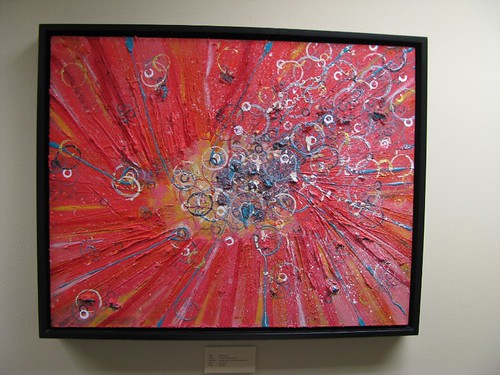
Renee Vevea, bulles d'air

Wednesday, September 04, 2013

September 2013 New Books

Football season is upon us! For those of you not into "handegg" - we got you some new books so you can occupy yourselves. Skol reading!!!
  1. Equal Employment of Persons with Disabilities: Federal and State Law, Accommodations, and Diversity Best Practices / Parry, John W.
  2. The Autistic Brain: Thinking Across the Spectrum / Grandin, Temple
  3. Dorland's Pocket Medical Dictionary, 29e
  4. Qualitative Inquiry and Research Design: Choosing Among Five Approaches / Creswell, John W.
  5. Pearls, Politics, and Power: How Women Can Win and Lead / Kunin, Madeleine
  6. Microaggressions and Marginality: Manifestation, Dynamics, and Impact / Sue, Derald Wing
  7. Effective Supervision: Supporting the Art and Science of Teaching / Marzano, Robert J.
  8. Introvert Power: Why Your Inner Life Is Your Hidden Strength / Helgoe Ph.D., Laurie
  9. Bad Leadership: What It Is, How It Happens, Why It Matters (Leadership for the Common Good) / Kellerman, Barbara
  10. What Therapists Don't Talk about and Why: Understanding Taboos That Hurt Us and Our Clients / Pope, Kenneth S.
  11. Contemporary Psychotherapies for a Diverse World / Jon Frew
  12. Start with Why: How Great Leaders Inspire Everyone to Take Action / Sinek, Simon
  13. CLEP Official Study Guide 2013 / The College Board
  14. Researching Lived Experience: Human Science for an Action Sensitive Pedagogy / Van Manen, Max
  15. A Different Mirror: A History of Multicultural America / Takaki, Ronald
  16. Don't Shoot the Dog!: The New Art of Teaching and Training / Pryor, Karen
  17. The Class (Entre Les Murs) DVD / François Bégaudeau
  18. The Neuroscience of Psychotherapy: Healing the Social Brain (Second Edition) / Cozolino, Louis
  19. Dual Relationships And Psychotherapy / Lazarus PhD ABPP, Arnold
  20. Lonely at the Top: The High Cost of Men's Success / Joiner, Thomas
  21. Beyond the Numbers: Making Data Work for Teachers & School Leaders / White, Stephen
  22. Data Wise: Revised and Expanded Edition: A Step-by-Step Guide to Using Assessment Results to Improve Teaching and Learning / Edited by Kathryn Parker Boudett
  23. Drowning in Data? How to Collect, Organize, and Document Student Performance / Shea, Mary
  24. Dissertations And Theses from Start to Finish: Psychology And Related Fields / Cone, John D.
  25. Finish Your Dissertation Once and for All!: How to Overcome Psychological Barriers, Get Results, and Move on With Your Life / Miller, Alison B.
  26. Designing Middle and High School Instruction and Assessment: Using the Cognitive Domain / Badgett, John L.

Tuesday, August 20, 2013

ProQuest Interruption

To our Saturday night researchers out there,

On August 24th, ProQuest will make storage infrastructure improvements. An eight hour (8) maintenance window is needed to perform the necessary infrastructure maintenance and during this time our ProQuest databases will not be available. The interruption will last from 9:00pm - 5:00am, Sunday morning.

Perfect! An excuse to go to the State Fair on Saturday night! Or watch SNL! Or, like me, sleep!

Actually, this interruption shouldn't affect you too much if you do need to do some homework on Saturday night. You can still search in SuperSearch and get the full text of darn near everything you need. But if you are linked to a ProQuest database to retrieve the full text of something, you'll get an error message. Our suggestion:
  1. Add those items to your SuperSearch folder
  2. Sign in on Sunday morning whilst sipping some coffee
  3. Retrieve the full text


Thursday, August 08, 2013

Using Folders and Notes in SuperSearch

Folders:
Folders are a great way to organize your research and streamline the process of reviewing your search results. You can access individual articles and eBooks, saved searches, checked-out eBooks, and more in your SuperSearch folder.
Create custom folders to organize resources for different assignments or courses.
  1. Select the Folder icon (in the upper right side of the SuperSearch page).
  2. Select "My Custom" (left toolbar).
  3. Select "New."
  4. Add a clever name.
  5. Select "Save."
As you review your search results, add useful-looking resources to your specialized folders.
Folder contents can be shared with colleagues.
  1. Select your clever custom folder name.
  2. Select "Share." (You can make access to your folder password protected.) 
  3. Enter email addresses.
  4. Select "Invite."


Notes:
New as of August 2013: In SuperSearch, you can create and save notes regarding specific resources, including articles, books, eBooks, and videos. Anything that you can find in SuperSearch, you can create a note for!

How to create a note:
  1. Log in to your personal SuperSearch account.
  2. Find a resource; select its title (this takes you to the item's record).
  3. Select the "Create Note" link in the toolbar to the right.
  4. Select the "New Note" button at the top of the record.
  5. Type a note in the space that pops up.
  6. Select the "Save" button.
  7. Success! Your note is saved and can be accessed and edited anytime by selecting the "Folder" icon in the upper right side of the SuperSearch page. Your note will also show up automatically when you open the item about which you wrote the note.
Check out the visual below. Select the image to enlarge it.


Using Search Alerts with SuperSearch

Save yourself time by setting up a search alert in SuperSearch. Search alerts automatically notify you each time a new article, book, or report is published that matches your search criteria. You can also be notified every time a new issue for a selected journal title is available.

How to set up an alert:
  1. Perform a search. A super search, if you will.
  2. Stare at the results page. 
  3. Select "Share" in the medium-upper right.
  4. Select either "Email Alert" or "RSS Feed" (you can be alerted by email or add your alert to your favorite RSS reader).
  5. Create the alert using the form that pops up (image #2 below).
  6. Select Save.
Select the images for a visual explanation.


Speaking from experience, the humble search alert is the ultimate tool for the professional who needs or wants to keep up-to-date on a specific topic, but is too lazy to go into a database and do a search every once and a while. 
Also speaking from experience, in Internet-nerd speak this translates to:
1. Perform search.
2. Set up search alert.
3. Profit.

How to Bookmark Twin Cities Library's Website

Save time by bookmarking your oft-visited webpages in your Internet browser. Directions for bookmarking webpages in popular Internet browsers are listed below.

And may we suggest bookmarking this guy:  www.smumn.edu/tclibrary
  1. Google Chrome
  2. Mozilla Firefox
  3. Safari
  4. Opera
  5. Internet Explorer

Thursday, August 01, 2013

Off Campus Issues with SuperSearch

SuperSearch isn't letting some users log in to access full text of resources this morning.
We're aware of the issue but haven't figured out what is causing it, yet.
Keep trying - we've experienced getting blocked, then logging in a few minutes later, and having access. It's weird.

This is the error message you'll see.


Also, you'll notice SuperSearch has an updated interface this morning, too! It is cleaner, stream-lined, and more modern looking. Tutorials will be updated soon to reflect the changes.